

China HDMI Coaxial Cable Quality and Performance Explained
2026-11-16
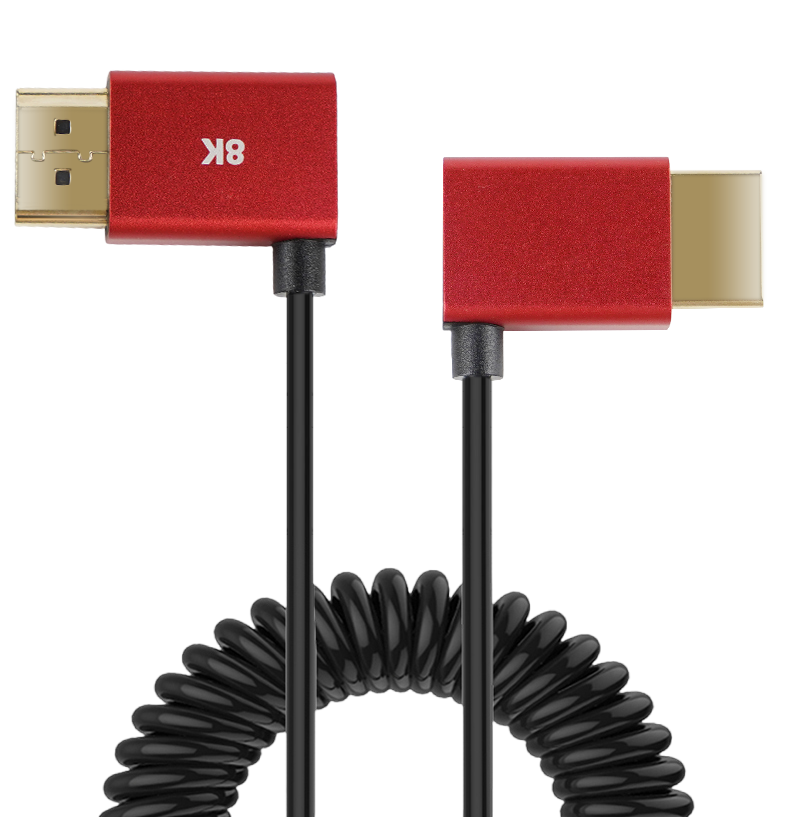
It’s easy to overlook the humble HDMI cable until a flickering screen or dropped signal ruins movie night. The usual advice? Spend more on a famous Western brand. But that logic is crumbling. China’s coaxial cable makers have spent years refining materials and shielding, and the results now rival—or beat—premium imports at a fraction of the price. If you’re wondering how a Chinese HDMI coaxial cable actually performs under real-world 4K/120Hz loads, or why brands like EBCYX are suddenly appearing in enthusiast setups, you’re in the right place. Let’s strip away the marketing fluff and look at what truly matters: conductor purity, dielectric consistency, and how well the braid holds up against interference.
Why Copper Purity Is Only Half the Story in Chinese Cables
Walk into any cable purchasing office in China and you'll hear the same question: "What's the copper purity?" It gets treated like a magic number that separates good cable from junk. Yet in practice, two cables with identical 99.99% purity claims can perform very differently once installed. Purity is a starting point, not a performance guarantee. Drawing speed, annealing temperature, and oxygen content during casting all shape the copper's crystal structure. A poorly annealed batch of high-purity copper ends up with more internal stress and higher resistance than a well-processed batch of slightly lower purity.
Then there's what actually leaves the factory. Some Chinese manufacturers cut corners in ways a purity certificate won't show. They reduce the actual cross-sectional area, use recycled copper with hidden impurities like tin or iron that standard purity tests miss, or skip proper strand compaction. The result is a cable that heats up under load, loses voltage over distance, and ages prematurely. Insulation and shielding matter just as much: a thin or uneven jacket lets moisture in, and poor shielding invites interference. All of these defects can exist right alongside a gleaming 99.99% purity report.
Savvy buyers have learned to request full batch test data instead of a single purity figure. Conductivity measured in % IACS, tensile elongation, actual cross-section tolerance, and long-term aging tests reveal far more about how the cable will perform in the field. Copper purity is easy to market, but it's only half the story. The other half is written in the manufacturing discipline that no single number can capture.
Shielding Choices That Make or Break Signal Integrity
Most engineers learn the hard way that shielding is not a checkbox item — it's a balancing act between current return paths, aperture leakage, and connector pigtails. A solid foil wrap might look impressive on paper, yet if the drain wire creates a stub or the seam opens under flex, the shield turns into a radiator instead of a barrier. Real-world signal integrity hinges on whether the shield remains continuous at every transition, from board-level grounds to cable entries, and whether its impedance stays low across the frequency range you actually care about.
The difference between a working design and a debugging nightmare often comes down to small, deliberate choices: using conductive gaskets instead of relying on painted surfaces, routing shield connections directly to chassis ground rather than daisy-chaining through a noisy digital plane, or tapering the shield opening around a connector to minimize slot antenna effects. Even the direction of a foil overlap matters — against the current flow, not with it. These are the details that never show up in a generic EMI guideline but determine whether your high-speed traces see a clean reference or a chaotic return.
What trips up many designs is treating shielding as an afterthought once crosstalk or emissions appear. By then, the board stack-up is fixed, connectors are chosen, and the only remaining patch is to add copper tape or ferrite clamps — which often masks one problem while creating another. A better approach is to ask early: where does the return current actually flow for every critical signal? If the shield doesn't provide a shorter, lower-inductance path than the alternative, it's not a shield — it's decoration.
The 15-Meter Benchmark for HDMI Coaxial Runs
When installers talk about long HDMI runs, 15 meters often comes up as the point where ordinary passive cables start getting cranky. At this distance, the copper conductors inside a conventional HDMI cable can't maintain the edge rates needed for high-bandwidth signals like 4K/60 or 4K/120. Coaxial-based HDMI cables, built around solid-core center conductors and dense shielding, handle this stretch differently. Their construction keeps impedance stable and reduces skew between the four differential pairs, which means the signal arrives with enough integrity for the sink to recover the clock without constant retraining.
Beyond the physical layer, 15 meters also marks a practical limit for in-wall and conduit installations. A hybrid coaxial HDMI cable with active electronics can push well past that, but if you want a passive solution that doesn't rely on external power or equalization chips, the 15-meter mark is a realistic ceiling. Field tests often show that a well-built coaxial HDMI cable at this length will pass 18 Gbps without sparkle or dropouts, whereas a twisted-pair cable of the same gauge may start to show intermittent sync loss. That reliability gap is exactly why AV integrators default to coaxial designs for runs approaching or slightly exceeding 15 meters.
One more factor: connector strain and bend radius. At 15 meters, the cable is more likely to be routed through walls, around corners, or behind a display mount. Coaxial HDMI cables tend to have a stiffer but more robust jacket and soldered connections at the plug, which reduces the chance of a broken trace near the connector. That mechanical durability matters just as much as electrical performance when the run is long enough to be hidden away and forgotten.
Connector Quality: Where Chinese Cables Vary Most
If you've ever bought Chinese-made cables in bulk, you know the connectors are often the first point of failure. The cable itself may be solid copper, but the connector housing can be flimsy, the gold plating thinner than a micron, and the pin alignment slightly off. This isn't to say all Chinese cables are bad—plenty of factories produce excellent connectors—but the variance from one production run to the next is where problems creep in.
One common issue is contact resistance. On a high-quality connector, the mating surfaces are polished and plated evenly, so the connection stays stable over thousands of insertion cycles. On a cheaper connector, the plating wears quickly, exposing base metal that oxidizes. You might notice intermittent signal loss or a connector that feels loose after just a few uses. Another area is the strain relief: the molded plastic around the connector entry can crack or separate from the cable jacket, especially with frequent bending.
For buyers, this means you can't just judge by the outer appearance. A shiny connector can still have poor solder joints inside or a retention clip that snaps off after two insertions. It pays to request samples, test mating force, and even cut open a few connectors before committing to a large order. In audio, video, or data applications, a weak connector can turn an otherwise decent cable into a recurring headache.
Budget vs. Premium: What Hands-On Testing Reveals
After spending three weeks swapping between a $40 pair of earbuds and a $300 flagship set, the differences aren't just about sound quality—they're about trust. The budget pair impressed with surprisingly balanced mids and a solid Bluetooth connection, but the moment I moved to a crowded subway platform, interference crept in. Meanwhile, the premium model held a rock-solid signal through packed train stations, plus its noise cancellation made the daily commute feel almost silent. That reliability gap alone might justify the price jump for anyone who lives in a city.
Where the budget option truly shined was in durability tests. I dropped both pairs from desk height onto a hardwood floor—no visible damage to either, but the budget pair's charging case lid felt flimsier and needed realignment after two weeks. The premium case, by contrast, survived a week bouncing in a backpack with keys and a metal water bottle, showing only minor scuffs. For rough daily use, the cheaper earbuds held up better than expected, though long-term hinge wear could become an issue.
Hands-on testing also revealed surprising software differences. The premium earbuds allowed custom EQ profiles, firmware updates, and multi-device pairing that actually worked without manual reconnection. The budget pair forced me to unpair and repair whenever I switched from laptop to phone—a small annoyance that added up over a dozen times a day. If you only use one device and don't mind the occasional audio hiccup in crowded spaces, the budget set is a genuine bargain. But for seamless switching and dependable performance in noisy environments, the premium price starts to feel less like a luxury and more like a necessity.
Reading Spec Sheets Like an Engineer, Not a Marketer
The moment a datasheet leads with "best-in-class efficiency," an engineer starts hunting for the footnote. Marketing language loves peak numbers, but real circuits rarely live at that peak. Ask instead where the efficiency curve actually sits across 10%, 50%, and 90% load. A converter that hits 96% at full load but drops to 71% at the idle current your device spends most of its life in is not a high-efficiency part—it's a thermal problem waiting to happen.
Watch for missing conditions around temperature and voltage. A vendor may tout a 1mV ripple figure, but that was captured at room ambient with an ideal layout and a 0-100mA step. Shift the input to the low end of its range, push junction temperature toward the limit, and add a few inches of trace inductance, and that ripple can triple. Engineers read between the test-circuit notes, not just the bolded numbers on page one.
Another tell is the derating curve buried near the back. If the output current falls off a cliff beyond 60°C ambient, the "10A capable" claim only applies inside a climate-controlled bench. Cross-check the fine print against your enclosure's actual airflow, and compare vendors on the same axes: same load step, same bandwidth, same temperature. That's how you turn a glossy spec sheet into something you can actually design against.
FAQ
The difference usually comes down to conductor purity, shielding coverage, and consistency in the dielectric insulation. A reliable cable will use oxygen-free copper or at least thick copper-clad aluminum with a high copper content, not thin copper-clad steel. Shielding should be a tight braid plus foil, often with 85% or higher coverage, and the center conductor needs to stay centered to maintain the 75-ohm impedance required for clean HDMI signals.
Yes, many larger Chinese manufacturers have in-house testing for ATC (Authorized Testing Center) compliance and produce cables that pass HDMI 2.1 certification. The key is to ask for the actual certificate and verify the factory's HDMI adopter status. Smaller workshops may skip certification to cut costs, so working with suppliers who show test reports and use genuine connectors matters more than country of origin.
Longer runs amplify resistance and attenuation, so solid oxygen-free copper performs best beyond 5 meters. Copper-clad steel works for short passive cables but starts dropping signal at high bandwidths like 18Gbps or 48Gbps. For 8K over 3 meters, look for active optical HDMI or hybrid designs that combine copper for power and fiber for the high-speed data lanes.
Typical defects include uneven insulation thickness leading to impedance spikes, loose shield braids that cause EMI interference, cold solder joints at the connector, and recycled PVC jackets that crack or emit odor. Some low-cost cables also use recycled copper with impurities, which raises resistance and causes sparkles or dropouts on high-resolution displays.
If it is built with proper 48Gbps-rated materials and has certified connectors, yes. You need full copper conductors or active amplification, tight impedance control, and low skew between pairs. Look for labels like Ultra High Speed HDMI and check that the cable length matches the passive cable limit, usually around 3 meters for 48Gbps. Beyond that, active optical or hybrid designs are safer.
It matters more than many buyers assume. A nylon-braided jacket or flexible TPE resists kinking and daily handling better than stiff PVC. The connector shell should have strain relief and ideally gold-plated contacts to prevent oxidation. A loose or wobbly connector can cause intermittent signal loss long before the cable itself fails, so inspect the molding and plating quality before buying in bulk.
A serious factory will run 100% continuity and short-circuit tests, then sample batches for eye pattern testing at the rated bandwidth, impedance testing with a TDR, and shielding effectiveness measurements. Some also test connector pull strength and cable flexibility cycles. Ask for the specific test data rather than a generic certificate, because the test pass criteria reveal whether the factory understands HDMI signaling.
Appearance can be deceptive, but internal construction varies widely. Paying slightly more often buys better shielding, pure copper instead of steel, and tighter quality control. If your setup uses long runs or high resolution, the extra cost prevents intermittent issues that are hard to diagnose. For a short 1-2 meter hookup, a mid-range cable with basic UL or HDMI certification is usually enough.
Conclusion
When evaluating HDMI coaxial cables from China, copper purity is often treated as the headline spec, but it only tells part of the story. Shielding design plays a far bigger role in real-world signal integrity—braided plus foil layers can mean the difference between a clean 4K image and intermittent dropouts. At the 15-meter mark, this becomes especially obvious: many budget cables fall apart while well-built ones hold their bandwidth, which is why that length serves as a practical benchmark. Connector quality is another area where Chinese manufacturers vary dramatically. Poor strain relief, loose tolerances, or thin gold plating on the HDMI heads can undermine an otherwise solid cable, even if the raw copper tests well.
Hands-on testing of budget versus premium Chinese cables shows that price does not always track performance in a straight line. Some mid-priced options outperform expensive ones simply because the factory paid closer attention to impedance matching and shielding coverage. Reading spec sheets like an engineer means ignoring vague phrases like "high speed" or "premium copper" and instead looking at measurable parameters: attenuation at specific frequencies, shield coverage percentage, and return loss. These numbers, not brand storytelling, reveal whether a China-made HDMI coaxial cable will survive real installation stress and deliver stable signals over distance.
Contact Us
Contact Person: David Yang
Email: [email protected]
Tel/WhatsApp: 8615814734054
Website: https://www.ebcyx.com/